Logitech MX Master 4 Adds Haptic Feedback for a Smarter Workflow
The Evolution of the MX Master Series
Logitech has long dominated the premium mouse market with its MX Master series, known for ergonomic design, quiet clicks, and the precision of its MagSpeed scroll wheel. The MX Master 4 doesn’t reinvent the wheel but introduces a subtle yet intriguing upgrade: haptic feedback.
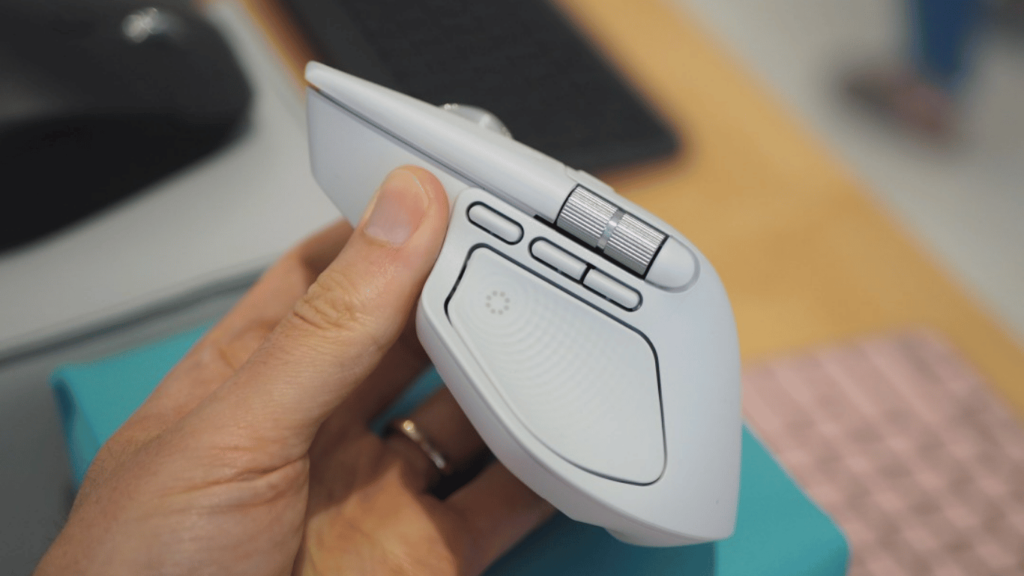
While the MX Master 3S was already a workhorse for professionals, the new model pushes interaction further with tactile cues that enhance productivity. By embedding a Haptic Sense Panel into the thumb rest, Logitech creates a new way to interact with applications, workflows, and shortcuts.
Haptics: More Than Just a Gimmick
Haptic technology is often associated with gaming controllers or smartphones, but Logitech’s implementation has a productivity-first approach. Pressing the Haptic Sense Panel activates the new Action Ring, a customizable radial menu filled with shortcuts.
-
Developers can program rings for IDE commands, such as launching builds, running scripts, or navigating project files.
-
Gamers may map in-game macros, media controls, or communication tools.
-
Creative professionals using tools like Affinity Photo or Photoshop can access alignment guides, copy/paste actions, or asset management.
Each action is punctuated by a tactile jolt, reinforcing muscle memory. For those who work across multiple monitors, an optional setting adds feedback when moving the cursor between screens—a small but practical touch that reduces workflow interruptions.
Logitech’s Action Ring and Smart Actions
The Action Ring isn’t entirely new—it has existed in Logitech’s software—but the MX Master 4 pairs it with physical haptics. This hybrid of software and hardware makes interactions feel more deliberate and satisfying.
Meanwhile, Smart Actions allow automation of repetitive workflows. Users can create macros to:
-
Launch a suite of apps with one press
-
Insert boilerplate text
-
Automate system-level functions
Haptics give these tasks tangible feedback, turning what was once invisible software automation into a sensory experience.
Hardware Refinements and Design Updates
Beyond haptics, Logitech refined the MX Master 4 in a few notable ways:
-
Design: Semi-transparent, frosted main buttons for a modern aesthetic.
-
Transmitter: Ships with a USB-C Bolt receiver, compatible with Logitech’s latest peripherals like the Signature Slim Solar Plus keyboard.
-
Battery: Up to 70 days on a charge, though high-intensity haptic settings reduce runtime.
-
Gestures: The gesture button has been relocated from the thumb grip to a new position under the horizontal scroll wheel, making commands easier to trigger without disrupting grip.
These refinements continue Logitech’s trend of balancing ergonomics with advanced features, ensuring the MX Master line remains the go-to for productivity-focused users.
Should You Upgrade to the MX Master 4?
For MX Master 3S owners, the leap may not feel dramatic. Battery life, ergonomics, and the scroll wheel remain familiar. The real value lies in the haptic-enabled Action Ring—but only if you commit to using Logitech’s Logi Options Plus software.
For new buyers, however, the MX Master 4 is a clear choice over its predecessor. At the same $119.99 price point, it offers all the proven strengths of the series plus a new haptic dimension.
Implications for Developers, Gamers, and Hardware Enthusiasts
-
Developers: Streamline repetitive coding or testing tasks with Smart Actions, supported by tactile confirmation.
-
Gamers: Though not marketed as a gaming mouse, customizable rings and macros can aid in streaming, managing overlays, or multitasking during play.
-
Hardware Ecosystem: The move to integrate haptics into productivity devices signals a shift. Logitech is expanding beyond traditional peripherals, experimenting with sensory feedback that could influence keyboards, trackpads, and even professional input devices.
Final Thoughts
Logitech’s MX Master 4 doesn’t chase gimmicks. Instead, it builds upon its strong foundation by adding haptic feedback as a subtle but meaningful layer of interaction. For professionals looking to save clicks, automate tasks, and enjoy an ergonomic tool that feels great in hand, the MX Master 4 represents a smart evolution of a proven design.
For a deeper dive into the latest hardware releases and innovations, visit Stay Ahead in Tech.