Microsoft Reveals a Major Office Icon Update
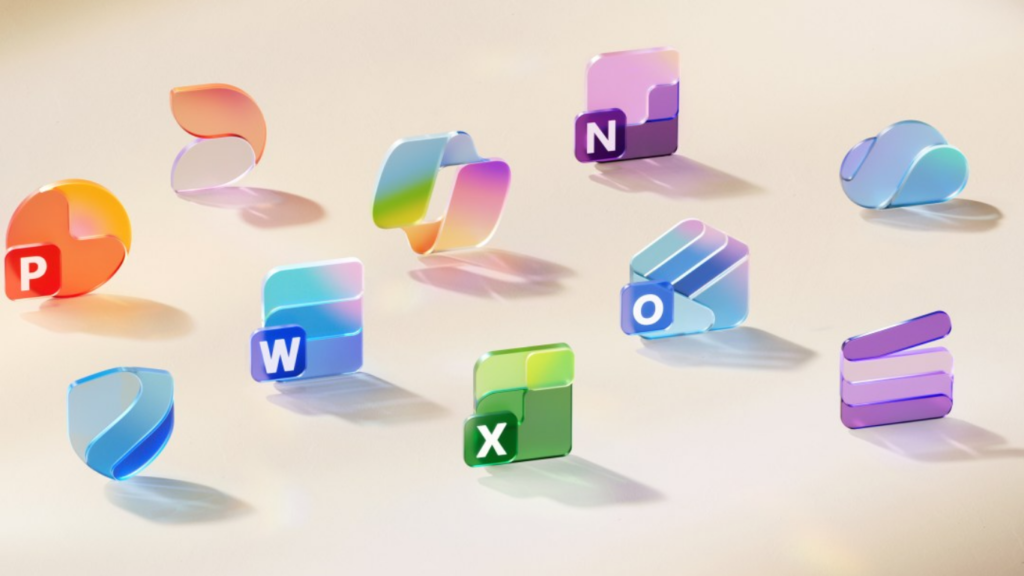
Microsoft has announced an updated design for its Office app icons, marking the first substantial change in seven years. The redesigned set brings more color depth, fluid forms, and improved accessibility, showcasing the company’s Fluent design philosophy and tighter Copilot integration within Microsoft 365.
The icons have been simplified to improve recognition across platforms, ensuring a consistent experience on web, desktop, and mobile devices.
A Bold Use of Gradients
One of the most noticeable shifts is the stronger use of gradients. Unlike past versions where shading was subtle, the latest icons employ richer, more vivid transitions. This change improves visual contrast while ensuring that the icons remain functional for users with varying accessibility needs.
Jon Friedman, corporate vice president of design and research for Microsoft 365, described the redesign as a way to “capture motion and playfulness while remaining simple, intuitive, and accessible.”
For example, the Word icon now has three horizontal lines instead of four, enhancing clarity on smaller screens.
The Evolution of Office Icons
Microsoft has a long tradition of refining its iconography to match broader software and branding updates. Early versions were built around rigid lines and sharp corners. The new set, however, embraces curves, folds, and softer geometry, reflecting a more approachable design style.
This streamlining ensures the icons remain distinct and legible, even in tight spaces such as taskbars or app grids.
Implications for Developers
For developers who build within the Microsoft ecosystem, these updates highlight the importance of usability and accessibility. Icons aren’t just branding; they’re functional markers that guide users through an interface.
By aligning their applications with Fluent design, developers can create experiences that feel consistent with Microsoft 365. This improves adoption rates, especially in enterprise environments where design harmony matters.
Why Gamers and Hardware Makers Should Notice
While a new set of icons might seem minor to gamers, it reflects Microsoft’s larger design vision across platforms, including Windows 11 and Xbox services. A unified look enhances user familiarity, making transitions between productivity and entertainment smoother.
For hardware manufacturers, the redesign brings added polish to preloaded devices. High-resolution displays will particularly showcase the rich gradients and refined curves, adding perceived value for end users.
Accessibility as a Priority
Microsoft has increasingly placed accessibility at the core of its product updates. The redesigned Office icons reinforce this approach, with higher contrast, simplified shapes, and more fluid forms.
These adjustments aren’t just about compliance—they’re about usability for everyone. Clearer visuals reduce strain, speed up recognition, and adapt better to different screen sizes and environments.
Rollout Timeline
The updated icons are set to roll out gradually across Microsoft 365 in the coming weeks. Both consumer and enterprise users can expect to see them appear on desktop, mobile, and web platforms.
The rollout coincides with Microsoft’s broader integration of Copilot and Fluent design, aiming for a cohesive user experience across its ecosystem.
Why This Redesign Matters
On the surface, refreshed icons may seem like a small detail. But Microsoft’s update underscores a wider effort to unify its products under a consistent, modern identity. By focusing on color, fluidity, and accessibility, the company strengthens brand recognition while improving functionality.
In a competitive software market, these updates demonstrate that user experience extends to even the smallest details. Microsoft is sending a clear signal: design matters as much as performance.
Conclusion
The latest Office icon redesign illustrates Microsoft’s commitment to accessibility, visual clarity, and ecosystem consistency. Developers, hardware makers, and everyday users alike will see the benefits of this refined design approach.
For more updates on design and technology shifts, explore KodeCraze News.